Skip to content

msoftnews

  • Home
  • About
  • Best Deals
  • Tools
  • Contact

Google Account Authentication Using Your Phone

January 16, 2012 by admin
Tweet

How do you login to your Google account on a computer you don’t trust? When you type your username and password, a keylogger could capture them and save them. If you have a phone or a tablet with you, there’s a better way:

1. Just go to accounts.google.com/sesame on your computer (Open Sesame helps you remember the address) and you’ll see a QR code for a special URL generated by Google.

2. Use a QR reader app like QR Reader for iPhone, Barcode Scanner for Android, Google Goggles, Google Shopper or Google Search for iOS. Scan the QR code on your phone or tablet and type the username and password of your Google account.

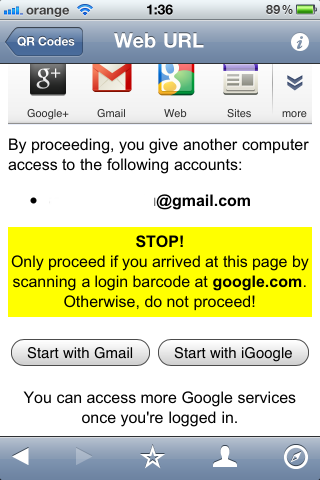
3. Now you can click “Start with Gmail” or “Start with iGoogle” and the corresponding service will automatically load in the desktop browser. Obviously, you can use any other Google service.

{ Thanks, Petros. }


Google Operating System

Related Posts:

  • Get Sticky Password Premium for only $23.99 with…
  • Reminder: It's time to save your inactive Google…
  • Losing SMS authentication on Twitter? Here's how to…
  • Save 24% off lifetime updates to PDF Reader Pro (for…
  • Save $10 on the digital Starfield version for PC and…
Categories Google Tags account, authentication, Google, Phone, Using
Log into your Google account by scanning a QR code
Why e-books will be much bigger than you can imagine

Product Highlight

This first widget will style itself automatically to highlight your favorite product. Edit the styles in Customizer > Additional CSS.

Learn more

Recent Posts

  • Microsoft Weekly: Windows 11’s taskbar is upgrading, better Task Manager alternatives, more
  • OneOdio Focus A1 Pro review: on budget, on-ear headphones
  • These fantastic Samsung Odyssey gaming monitors are down to their lowest prices
  • Save 20% on this compact Logitech MX Mini keyboard
  • Intel expands XeSS multi-frame generation to Battlemage, Alchemist GPUs and more
  • Privacy Policy
  • Terms
  • Contact
© 2026 msoftnews • Built with GeneratePress