Last week the sign-in page for Hotmail (and other sign-in pages that use Windows Live ID) has changed from multiple user tiles to one account…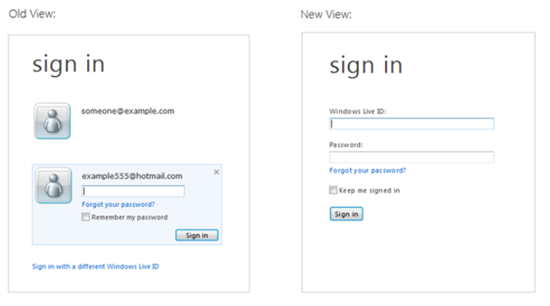
Why? That’s a good question. According to Eric Doerr there were some problems with the old design:
- Customer confusion: We got consistent reports from customers who were confused by the design. Not understanding which checkbox did what and as a result accidentally leaving account tiles at an internet cafe or a friend’s house were common complaints. Depending on your settings, sometimes you were signed in but still had to click the tile, sign-out didn’t always work as expected, sometimes you had to enter a password and sometimes not – it seemed random and confusing. To make matters worse, tiles only worked on Internet Explorer; other browsers always had the simpler experience.
- Changing trends in device ownership: As more people bought laptops and smartphones (which tend to be used by just one person), we heard more feedback that the tiles just got in the way, and what people really wanted to do was to just get to the service without interruption. We knew from our telemetry that fewer than 2% of users were using the tiles, but 100% of our users were interrupted by them in the old design.
- Consolidation on a primary account: Increasingly, customers are consolidating their Windows Live usage into one primary account. It used to be common for one person to have multiple accounts. As we’ve integrated Windows Live ID across other products like Xbox, Windows Phone, SkyDrive, and Office –the core account has become more valuable, and it’s become less necessary to switch between accounts.
So considering they added features to Hotmail that solve scenarios that previously required juggling multiple accounts, such as adding other email accounts and creating aliases, they felt it was time to change the sign-in. Now the whole thing is focused one one account per device.
In his blog post Eric gives tells us how we can best set up things in the new design. Going from resetting your password (if you forgot, which is understandable if you keep signed in all the time not having to re-type) to how to manage multiple accounts. There he tells about adding email accounts and creating aliases but forgot one other solution: linked IDs, that way you sign in with one account and move to the next from the dropdown (your name). That is limited to just 4 IDs, but hey…one can get creative with that….let’s hope that feature will stay! I for one make use of that one heavily.